In every day life, we are often making decisions. We perform different tasks while taking decisions. For example, the statement ‘Bring one litre of milk while returning home from college, if the milk shop is open’ involves this phenomenon.
In this statement, there is an element of decision making. We bring one litre of milk if the shop is open. And if the shop is closed, we come back to home without milk.
Thus we are making a decision on the condition that the shop is open. The decision-making process is everywhere in our daily life. We see that the college gives admission to a student if he has the required percentage in his previous examination and/or in the entry test. Similarly administration of a basketball team of the college decides that the students having height more than six feet can be members of the team.
For writing interesting and useful programs, we have to develop the decision making power in them.
Now we will see what kind of decisions are in programming and how these can be used.
Every programming language provides a structure for decision making.
'C' also provides this structure. The statement used for decisions in 'C' language is known as the 'if statement'. The if statement has a simple structure. That is
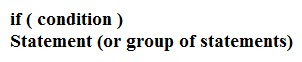
We explain it as if condition is true, then execute the statement or a group of statements. Here the condition is a statement which explains the condition on which a decision will be made. We can understand it from the example that Ali can become the member of the basket ball team if he has a height more than six feet .In this case, the condition will be

We have written the condition in English language. Now let's see how we can implement this in terms of variables, operators and C statements. In the program, we will write the condition in parentheses, followed by a statement or group of statements to be executed.
Now here is the concept of block of statements. We use braces { } to make a group (block) of a number of statements. We put ‘{’ before first statement and ‘}’ after the last statement. Thus if we have to do many things after the if statement. The structure of if statement becomes as under
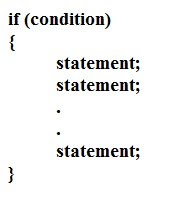
Note the indentation of the lines and semi-colon after each statement. Semi-colons are necessary after every C statement. The indentation is only a matter of style. It makes the code easy to read and understand from where a block starts, ends and what kind of block it is. It does not affect the logic of the program. But the braces can affect the logic. We can also write a comment line to state the purpose of code block.
Let's consider a simple example to explain the if statement. Suppose, we have ages of two students (say for the time being we have got these ages in variables). These variables are- age1 and age2. Now we say that if the age1 is greater than age2, then display the statement ‘Student 1 is older than student 2’.
The coding for this program will be as below
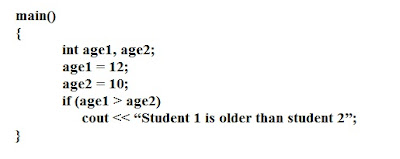
Here, in our code we see a new operator i.e. ‘ > ‘ (greater than) in the if statement. We need such operators (like greater than, less than, equal to etc) while making decisions. These operators are called 'relational operators'. These are almost the same relational operators we use in algebra.
Following table summarizes the relational operators.
Note that there is no space between ==, >=, <= and !=. These are considered as single operators. The operator == (equal to) is different from the operator =. We know that operator = is the assignment operator which is used in assignment statement to assign a value to a variable. Don't confuse the assignment operator (=) with equal to operator (==). If we write single = in condition of if statement. For example, if we write if ( x = 2 ), the compiler will not give error. This means that it is not a syntax error. The conditional expression in if statement returns a value. In this case, x = 2 will also have some value but it will not in the form of true or false. So it will create a logical error. So be careful while using equal to condition in if statement. For previous lesson click here: Use of Operators
For next lesson click here: Flow Charting
In this statement, there is an element of decision making. We bring one litre of milk if the shop is open. And if the shop is closed, we come back to home without milk.
Thus we are making a decision on the condition that the shop is open. The decision-making process is everywhere in our daily life. We see that the college gives admission to a student if he has the required percentage in his previous examination and/or in the entry test. Similarly administration of a basketball team of the college decides that the students having height more than six feet can be members of the team.
For writing interesting and useful programs, we have to develop the decision making power in them.
Now we will see what kind of decisions are in programming and how these can be used.
Every programming language provides a structure for decision making.
'C' also provides this structure. The statement used for decisions in 'C' language is known as the 'if statement'. The if statement has a simple structure. That is

We explain it as if condition is true, then execute the statement or a group of statements. Here the condition is a statement which explains the condition on which a decision will be made. We can understand it from the example that Ali can become the member of the basket ball team if he has a height more than six feet .In this case, the condition will be

We have written the condition in English language. Now let's see how we can implement this in terms of variables, operators and C statements. In the program, we will write the condition in parentheses, followed by a statement or group of statements to be executed.
Now here is the concept of block of statements. We use braces { } to make a group (block) of a number of statements. We put ‘{’ before first statement and ‘}’ after the last statement. Thus if we have to do many things after the if statement. The structure of if statement becomes as under

Note the indentation of the lines and semi-colon after each statement. Semi-colons are necessary after every C statement. The indentation is only a matter of style. It makes the code easy to read and understand from where a block starts, ends and what kind of block it is. It does not affect the logic of the program. But the braces can affect the logic. We can also write a comment line to state the purpose of code block.
Let's consider a simple example to explain the if statement. Suppose, we have ages of two students (say for the time being we have got these ages in variables). These variables are- age1 and age2. Now we say that if the age1 is greater than age2, then display the statement ‘Student 1 is older than student 2’.
The coding for this program will be as below

Here, in our code we see a new operator i.e. ‘ > ‘ (greater than) in the if statement. We need such operators (like greater than, less than, equal to etc) while making decisions. These operators are called 'relational operators'. These are almost the same relational operators we use in algebra.
Following table summarizes the relational operators.
| Algebraic | In C language | Example | Meaning | |
| Greater than | > | > | x > y | x is greater than y |
| Equal to | = | == | x == y | X is equal to y |
| Less than | < | < | x < y | X is less than y |
| Greater than or equal to | ≥ | >= | x >= y | x is greater than or equal to y |
| Less than or equal to | ≤ | <= | x <= y | x is less than or equal to y |
| Not equal to | ≠ | != | x != y | x is not equal to y |
Note that there is no space between ==, >=, <= and !=. These are considered as single operators. The operator == (equal to) is different from the operator =. We know that operator = is the assignment operator which is used in assignment statement to assign a value to a variable. Don't confuse the assignment operator (=) with equal to operator (==). If we write single = in condition of if statement. For example, if we write if ( x = 2 ), the compiler will not give error. This means that it is not a syntax error. The conditional expression in if statement returns a value. In this case, x = 2 will also have some value but it will not in the form of true or false. So it will create a logical error. So be careful while using equal to condition in if statement. For previous lesson click here: Use of Operators
For next lesson click here: Flow Charting
the easiest way to learn programming
introduction to programming
Conditional Statements
