Now let’s see the usage of relational operators by an example. There are two students Amer and Amara. We take their ages from the user, compare them and tell who is older?
As there are two students to be compared in terms of age, we need to declare two variables to store their ages. We declare two variables AmerAge and AmaraAge of type int. The variable names are one continuous word as we can’t use spaces in a variable name.
Here is an important point about variables declaration. We should assign an initial value (preferably 0 for integers) to variables when we declare them. This is called initialization of variables.
We can do this in one line while declaring a variable like int x = 0; This statement will declare a variable of name x with data type int and will assign a value 0 to this variable. Initializing a variable in this way is just a matter of style. You can initialize a variable on a separate line after declaring it. It is a good programming practice to initialize a variable.
Now we prompt the user to enter Amer’s age and store it into variable AmerAge. Then similarly we get Amara’s age from the user in the variable AmaraAge.
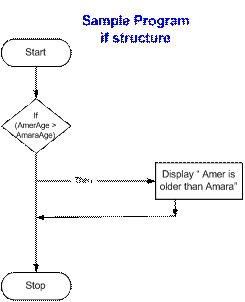
While comparing the ages, we will use the if statement to see whether Amer’s age is greater than Amara’s. We will use > (greater than) operator to compare the ages. This can be written as if ( AmerAge > AmaraAge) .
With this if statement, we write the statement cout << "Amer is greater than Amara" ; It’s a simple one line test i.e. ‘if Amer’s age is greater than Amara's’, then display the message ‘Amer is older than Amara’. Flow chart of the sample program:
The complete code of the program is given below.

In our program, we write a single statement with the if condition. This statement executes if the condition is true. If we want to execute more than one statements, then we have to enclose all these statements in curly brackets { }. This comprises a block of statements which will execute depending upon the condition. This block may contain a single statement just like in our problem. So we can write the if statement as follow.

A sample execution of the program results the following output.

Now think what happens if the condition in the if statement is not true i.e. Amer’s age is not greater than Amara’s. In this case, if the user enters Amer’s age less than Amara’s, then our program does nothing. So to check this condition, another if statement after the first if statement is required. Then our program will be as:

Now our program decides properly about the ages entered by the user.
After getting ages from the user, the if statements are tested and if statement will be executed if the condition evaluates to true.
For previous lesson click here: Flow Charting
For next lesson click here: If/else Structure
As there are two students to be compared in terms of age, we need to declare two variables to store their ages. We declare two variables AmerAge and AmaraAge of type int. The variable names are one continuous word as we can’t use spaces in a variable name.
Here is an important point about variables declaration. We should assign an initial value (preferably 0 for integers) to variables when we declare them. This is called initialization of variables.
We can do this in one line while declaring a variable like int x = 0; This statement will declare a variable of name x with data type int and will assign a value 0 to this variable. Initializing a variable in this way is just a matter of style. You can initialize a variable on a separate line after declaring it. It is a good programming practice to initialize a variable.
Now we prompt the user to enter Amer’s age and store it into variable AmerAge. Then similarly we get Amara’s age from the user in the variable AmaraAge.
While comparing the ages, we will use the if statement to see whether Amer’s age is greater than Amara’s. We will use > (greater than) operator to compare the ages. This can be written as if ( AmerAge > AmaraAge) .
With this if statement, we write the statement cout << "Amer is greater than Amara" ; It’s a simple one line test i.e. ‘if Amer’s age is greater than Amara's’, then display the message ‘Amer is older than Amara’. Flow chart of the sample program:

The complete code of the program is given below.

In our program, we write a single statement with the if condition. This statement executes if the condition is true. If we want to execute more than one statements, then we have to enclose all these statements in curly brackets { }. This comprises a block of statements which will execute depending upon the condition. This block may contain a single statement just like in our problem. So we can write the if statement as follow.

A sample execution of the program results the following output.

Now think what happens if the condition in the if statement is not true i.e. Amer’s age is not greater than Amara’s. In this case, if the user enters Amer’s age less than Amara’s, then our program does nothing. So to check this condition, another if statement after the first if statement is required. Then our program will be as:

Now our program decides properly about the ages entered by the user.
After getting ages from the user, the if statements are tested and if statement will be executed if the condition evaluates to true.
For previous lesson click here: Flow Charting
For next lesson click here: If/else Structure
the easiest way to learn programming
introduction to programming
IF Sample Program 1


